Accounts Receivable Automation: How to Start

Accounts Receivable Automation: What to Automate and How to Start
An overdue invoice does not always mean a customer is unwilling to pay.
The invoice may have gone to the wrong contact. A purchase order number may be missing. The customer may be waiting for a credit note, or may have already paid without providing a clear invoice reference.
For the accounts receivable team, each situation creates a different task. Someone has to find the information, contact the right person, resolve the issue and update the records. Sending another payment reminder may achieve very little until that work is done.
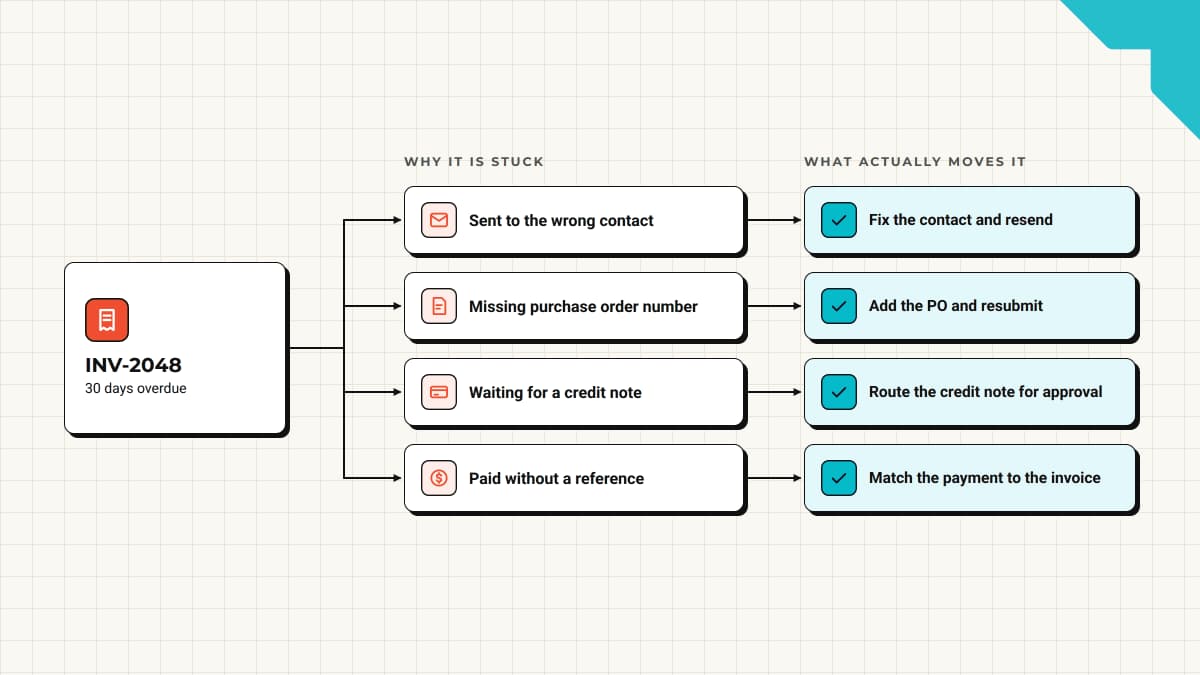
Accounts receivable automation helps finance teams manage these tasks across billing, collections, payment matching and dispute resolution. The starting point is understanding where invoices get delayed and which steps can move forward automatically.
What Is Accounts Receivable Automation?
Accounts receivable automation uses software to manage tasks involved in invoicing customers, collecting payments, applying cash and tracking outstanding balances. It connects transaction data, business rules and workflows so that routine work progresses automatically and exceptions reach the person responsible for resolving them.
For example, an automated workflow can identify an overdue invoice, check whether it is disputed, send an appropriate reminder and record the follow-up. If the customer replies with a billing issue, the workflow can route that issue to the billing team with the invoice and supporting documents attached.
Accounts receivable, or AR, is part of the broader order-to-cash process. Problems in orders, contracts, delivery records and billing can therefore affect how quickly a receivable is collected.
Effective AR automation needs to account for these dependencies.
What Should You Automate in Accounts Receivable?
The best candidates are tasks that happen frequently, follow reasonably clear rules and require people to move information between systems.
| AR activity | What can be automated | What needs review |
|---|---|---|
| Invoice preparation | Gather billing inputs, check required fields and flag missing information | Unusual charges and contract interpretation |
| Invoice delivery | Send invoices and supporting documents to approved contacts; track delivery or submission status | Customer-specific submission exceptions |
| Collections | Schedule reminders, prioritize accounts and create follow-up tasks | Sensitive accounts and payment negotiations |
| Cash application | Match incoming payments to open invoices using approved rules | Ambiguous matches, deductions and unexplained differences |
| Dispute management | Capture issues, assign owners and track resolution | Whether a claim is valid and what adjustment to approve |
| Credit notes | Route requests through approval and update related workflows | Approval of financial adjustments |
| Reporting | Refresh aging reports, exception queues and performance dashboards | Interpretation and management decisions |
1. Invoice Validation and Delivery
A collections problem may begin before an invoice reaches the customer.
If a customer requires a purchase order number and the invoice does not include one, the document may be rejected. If proof of delivery is required, the invoice may remain unprocessed until someone supplies it.
Automation can check customer-specific requirements before an invoice is released, including:
- Purchase order references and billing contacts.
- Agreed payment terms.
- Required supporting documents.
- Duplicate invoice checks.
- Approved delivery channels.
The workflow should identify missing information and assign it to an owner. Otherwise, finance still has to chase the same inputs manually.
For invoices submitted through customer portals, tracking successful submission matters as much as creating the invoice. A generated invoice and an accepted invoice are different milestones.
2. Collections and Payment Follow-Up
Collections automation can schedule reminders around due dates, overdue balances and customer segments. Microsoft Dynamics 365 Finance, for example, supports collections strategies that identify invoices requiring emails, collection activities or letters.
The design question is what the workflow should check before contacting a customer.
Has the payment already arrived? Is there an open dispute? Has the customer promised to pay on a specific date? Is an account manager already handling the issue?
A useful workflow checks this context and determines the next action. It may send a reminder, create a collector task, pause follow-up or escalate an unresolved issue.
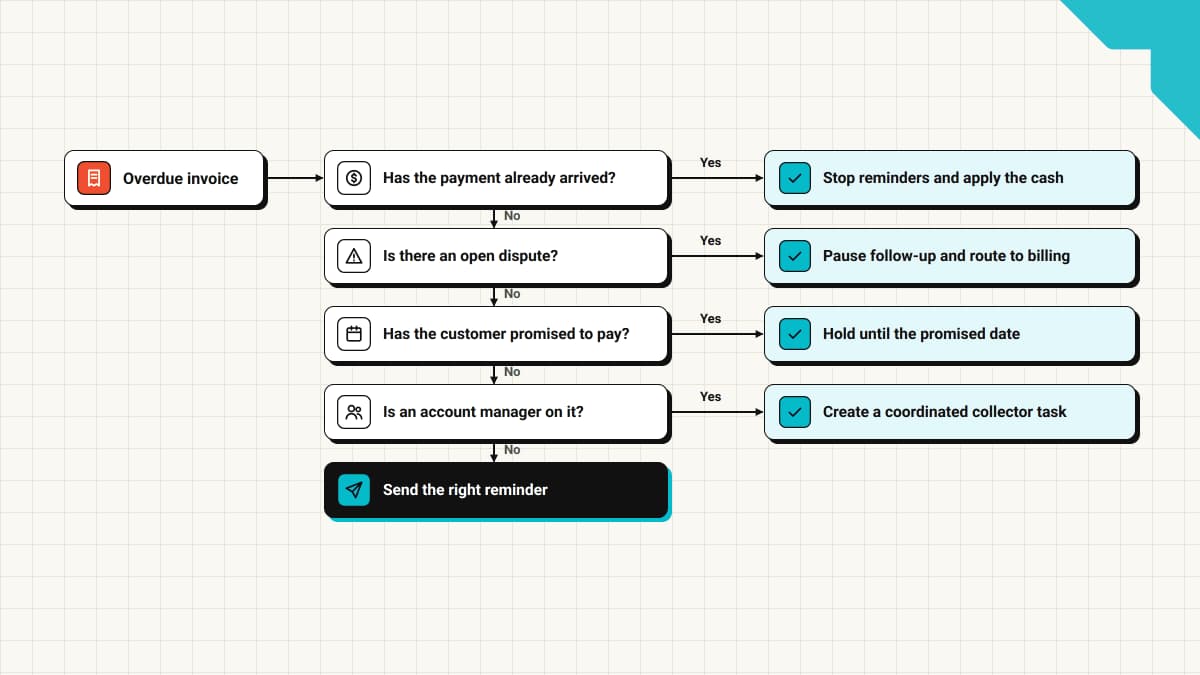
This also gives collectors a more useful daily worklist. Rather than reviewing every overdue invoice in the same way, they can focus on accounts where intervention is needed.
3. Cash Application Automation
Cash application is the process of matching customer payments to outstanding invoices.
Straightforward payments may be matched using customer identifiers, invoice references, amounts and remittance details. More complex cases include one payment covering several invoices, partial payments, deductions and payments without usable references.
Automation should apply clear matches under approved rules and put uncertain cases into a review queue. Oracle documents this distinction through receipt matching that can either apply receipts automatically or present recommendations for application.
For the person reviewing an exception, the workflow should show the payment, possible invoice matches, supporting evidence and the reason automatic application was stopped.
Reducing the time spent investigating unmatched payments can be valuable even when those payments still require human approval.
4. Disputes, Deductions and Credit Notes
An invoice marked “disputed” tells finance why collection has stopped, but it does not resolve the problem.
The customer may have questioned the price, quantity, delivery or scope of service. Resolving the issue may require input from sales, operations or billing.
Automation can create a dispute record, collect supporting documents, assign an owner and track the next action. If a credit note is needed, the request can move through the appropriate approval process.
The collections workflow should then reflect the resolution. This avoids situations where one team approves an adjustment while another continues chasing the original amount.
Every exception needs an owner, a next action and a record of the outcome. Without these, automation may simply create a faster-growing queue.
How Does AI Support Accounts Receivable Automation?
AI is most useful when the information needed to progress a task arrives in an unstructured form, such as an email or remittance document.
Potential uses include:
- Extracting invoice references and payment details from remittance advice.
- Identifying whether a customer reply concerns a dispute, payment promise or request for documents.
- Summarizing account history before a collector contacts a customer.
- Suggesting possible matches for payments with incomplete references.
- Drafting responses using approved account information.
These capabilities should support a defined workflow. For example, identifying a pricing dispute in an email is useful if it creates a case for the billing team and updates the collection status.
Financial decisions need explicit controls. AI-generated recommendations should not automatically authorize credit notes, write-offs or uncertain payment allocations. The system should preserve the source information and make it clear where review is required.
Can You Automate Accounts Receivable Without Replacing Your ERP?
Often, yes. The first step is to review what the existing ERP already supports.
Your finance system may already provide invoice management, collections rules and receipt matching. The remaining work may sit in email, spreadsheets, customer portals or another business application.
In that situation, the requirement may be to connect the work around the ERP: gather documents, route disputes, coordinate approvals and return validated updates to the finance system.
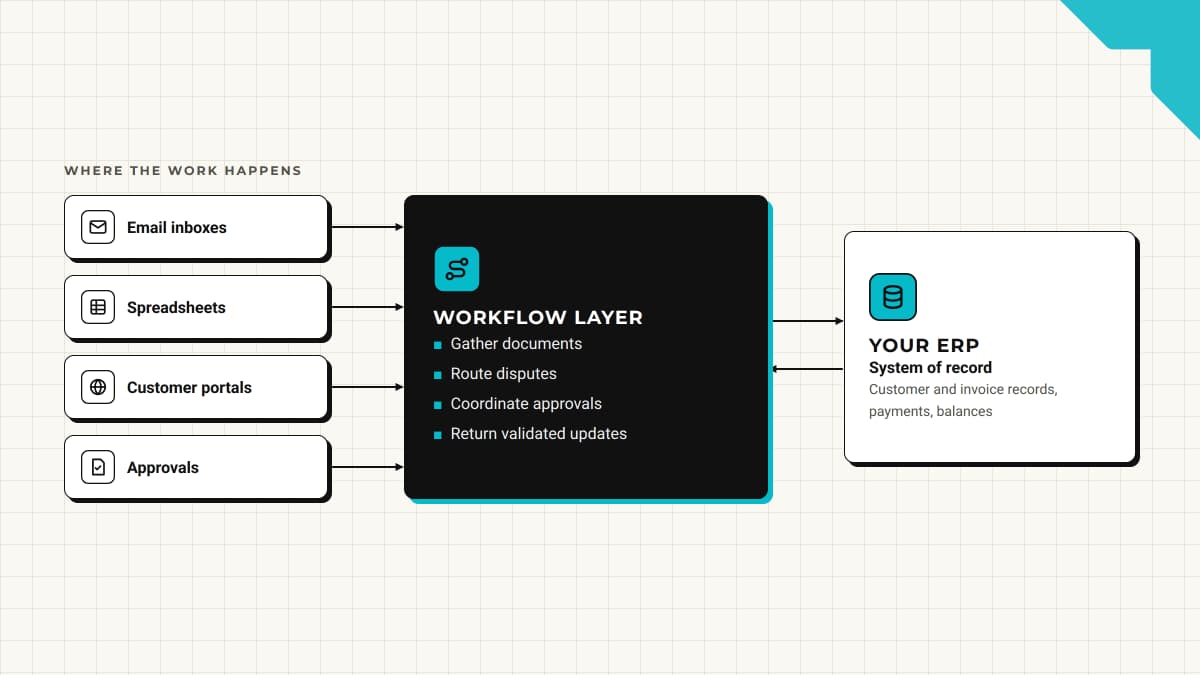
A practical design should establish:
- Which system owns customer and invoice records.
- Where payment and dispute statuses are maintained.
- How frequently information is synchronized.
- Which actions can update financial records.
- What happens when an integration fails.
These decisions prevent conflicting records and help ensure that customer communications use current information.
How to Start Accounts Receivable Automation
Step 1: Find the Largest Source of Avoidable Work
Review a representative set of overdue invoices and unmatched receipts.
Ask why each item remains unresolved. Separate customer payment delays from internal issues such as missing documents, billing errors, unallocated cash and pending approvals.
This gives you a starting point based on actual work. If most collector time is spent locating documents, reminder automation alone is unlikely to address the main problem.
Step 2: Choose One Workflow With a Clear Boundary
Start with a manageable scope, such as:
- Collections follow-up for one customer segment.
- Invoice validation for one business unit.
- Cash application for payments with reliable references.
- Dispute routing for one recurring issue.
Define what enters the workflow, what successful completion looks like and which situations require manual handling.
Step 3: Establish a Baseline
Measure the current process before changing it.
Useful measures include the number of manual touches, time spent per case, unresolved exceptions and time between key milestones.
For collections, track how quickly eligible accounts receive follow-up. For cash application, track how long receipts remain unapplied. For disputes, track how long cases wait for an owner or decision.
These measures make it easier to see whether the pilot is improving the work.
Step 4: Define Rules and Ownership
Agree on reminder schedules, escalation conditions, matching tolerances and approval requirements.
Also establish who handles exceptions. A disputed invoice should not sit indefinitely between finance and sales because neither team owns the next step.
Access controls, approval records and audit trails should be included from the start.
Step 5: Test Against Real Exceptions
Test the workflow with scenarios such as partial payments, missing references, disputed invoices, duplicate messages and failed integrations.
For automatic payment application, compare proposed matches with reviewed outcomes before enabling unattended processing.
For customer communications, verify that payment updates, disputes and agreed pauses affect the next reminder as intended.
Step 6: Expand After Reviewing the Results
Review whether the workflow saves time, maintains accuracy and makes unresolved work easier to manage.
If reminders are now timely but invoices remain unpaid because disputes take too long to resolve, dispute management may be the next priority. Let the results guide the expansion.
How Should You Measure the Impact?
| Metric | What it helps you assess |
|---|---|
| Invoice release time | How quickly billing inputs become an issued invoice |
| Invoice rejection rate | How often invoices fail customer submission requirements |
| Follow-up coverage | Whether eligible overdue accounts receive timely attention |
| Automatic cash application rate | How many receipts are correctly applied without manual intervention |
| Unapplied cash value and age | How much received cash remains unallocated, and for how long |
| Dispute resolution time | How quickly billing issues are resolved |
| Manual effort per transaction | Whether repetitive work has reduced |
| Days sales outstanding | The broader time taken to collect credit sales |
Days sales outstanding, or DSO, matters, but it should be interpreted alongside payment terms, sales patterns and customer mix. Faster invoice processing does not automatically mean customers will pay sooner.
Operational measures help identify what has improved and what still needs attention.
What Better Billing Can Contribute
In our work on billing automation for a US print and communications enterprise, billing time fell from around seven days to approximately three days, with reported invoice accuracy of 99% and an 80% reduction in manual effort across the transformed workflows.
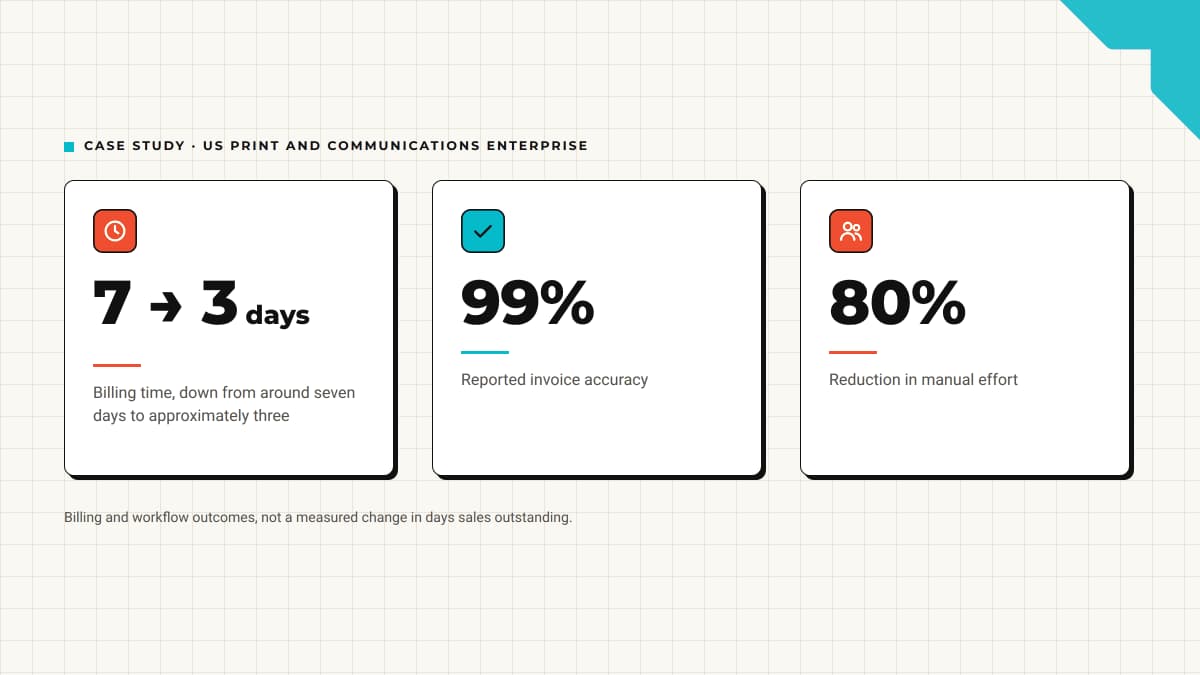
These are billing and workflow outcomes, rather than a measured DSO reduction. They illustrate the value of improving the work that happens before collection begins: preparing accurate invoices and reducing manual processing delays.
For an AR team, that upstream work deserves a place in the automation discussion.
Start With the Reason Payment Is Delayed
Accounts receivable automation works best when it addresses a specific source of delay.
That may mean getting invoices accepted the first time, giving collectors reliable account information, applying payments sooner or making another department responsible for resolving a dispute.
At LOWCODEMINDS, we help finance teams identify where manual work is delaying billing and collections, then build workflows that connect the systems, information and people needed to resolve it.
If your team is spending too much time chasing documents, matching payments or following up on unresolved invoices, book an AI Value Diagnostic with LOWCODEMINDS to identify where automation could make the greatest difference.
Start with the highest-volume source of avoidable work that has clear rules and reliable data. This might be invoice validation, collections follow-up or straightforward payment matching. Review actual delays before choosing.
Collections automation focuses on following up outstanding payments. AR automation covers a wider set of activities, including invoicing, cash application, disputes, credit note workflows and reporting.
It can identify and route them through defined workflows. Partial payments need allocation rules, while disputes need investigation, ownership and approval where an adjustment is required. Some cases will continue to need human judgment.
It may help by reducing invoice delays, improving follow-up and resolving issues sooner. The result depends on customer behavior, payment terms and the causes of overdue balances. Any DSO improvement should be measured rather than assumed.
AI can help extract information from invoices, contracts, statements, and other semi-structured documents, identify likely matches, classify exceptions, detect anomalies, and assist with discrepancy investigation. Financial controls and human oversight should remain part of the workflow where appropriate.
Exception-based reconciliation is an operating model in which technology automatically matches and clears routine transactions while finance employees focus on records that fail matching rules or require investigation. This reduces the amount of manual review required as transaction volumes grow.
In many cases, yes. If reconciliation rules are inconsistent, processes are undocumented, or outcomes depend heavily on individual knowledge, organizations should standardize the process before automating it. Well-defined rules, ownership, data sources, and exception procedures make reconciliation automation easier to govern and scale.
Potential benefits include lower manual effort, faster reconciliation cycles, fewer errors, earlier discrepancy detection, stronger audit trails, faster billing and financial close, and greater scalability as transaction volumes increase.
LOWCODEMINDS is a global leader in AI-led enterprise process orchestration and Knowledge Work Automation, transforming fragmented workflows into orchestrated, AI-driven decision systems that help enterprises modernize and scale business operations. Recognized as a Top Player and Contender in the ISG Provider Lens® Intelligent Automation Services 2025 (U.S.) study, the company is at the forefront of next generation automation and enterprise transformation.
LOWCODEMINDS helps enterprises transform knowledge intensive and compliance heavy enterprise value chains through trusted, governed, and scalable AI automation that delivers measurable operational and financial outcomes. Powered by App Labs, its dedicated innovation division, the company has developed 7+ Enterprise Value Chain Frameworks, 20+ reusable Agentic AI Accelerators, and 18+ enterprise ready solutions across industries including BFSI, Legal, Manufacturing, Retail, CCM, and Telecommunications.

Headquarters:
8, The Green Ste B, Dover, DE 19901.
[email protected]
(276) 451-3607
2026
LOWCODEMINDS | Privacy Policy