Document Processing Automation with AI: How It Works

How to Automate Vendor and Customer Document Processing Using AI
A garment manufacturer receiving purchase orders from multiple international buyers faces a challenge that its ERP system alone cannot solve. Each buyer sends orders in a different format, uses different product and color codes, follows different size conventions and sometimes specifies quantities in different units of measurement.
Before an order can be entered into the ERP, a merchandiser must interpret the document, refer to internal master data, convert quantities, validate specifications and resolve discrepancies. An incorrect color code, size mapping or delivery instruction can affect procurement, production planning and ultimately the delivery of the finished product.
The same problem exists across industries. Finance teams interpret supplier invoices and customer remittance documents. Distribution companies reconcile product codes and quantities across packing lists. Procurement teams validate supplier quotations against internal purchasing requirements.
Much of this work continues to be performed manually, even in organizations that have invested in ERP systems, OCR and document capture tools.
AI-powered document processing automation can address this challenge by combining data extraction, intelligent data mapping, master data validation, workflow automation and integration with existing enterprise systems.
The opportunity goes beyond extracting information from a document. It lies in understanding what that information means to the business and acting on it correctly.
Why Enterprises Still Rely on Manual Document Processing
Organizations working with multiple suppliers and customers have limited control over the formats in which they receive information. Asking every business partner to adopt a common document template is rarely practical.
Consider a manufacturer receiving purchase orders and supporting documents from 30 different buyers. If each buyer uses four different document types, the organization could be dealing with 120 document layouts, each of which may change over time.
The challenge typically exists at three levels.
Different field names: One customer may use "Color Code", another may use "Clr Cd", while a third may simply use "Shade". All three could refer to the same field in the manufacturer's ERP.
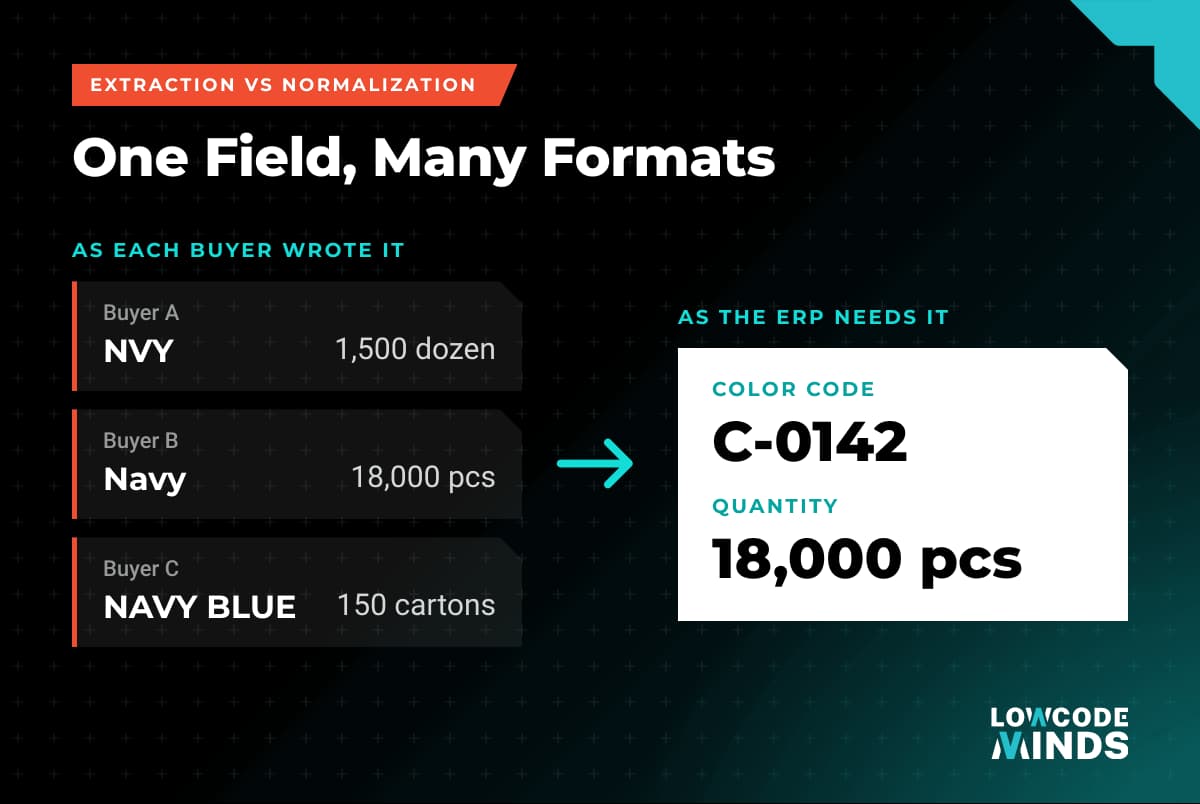
Different data values: A customer may refer to a product color as "NVY", while the manufacturer's internal color master identifies it as "C-0142". Establishing this relationship requires access to business-specific information.
Different document structures: One customer may list sizes across columns, while another lists them in rows. Quantities may be expressed in pieces, dozens or cartons, requiring conversion before they can be entered into the ERP.
Employees spend considerable time resolving these differences, consulting spreadsheets, checking master data and communicating with colleagues. As transaction volumes increase, organizations often respond by adding more people to manage the workload without addressing the underlying problem.
Why OCR and Data Extraction Alone Are Not Enough
Optical Character Recognition (OCR) and Intelligent Document Processing (IDP) have helped enterprises reduce the effort involved in capturing information from business documents.
However, extracting information accurately does not necessarily make it ready for use in an enterprise system.
There are two distinct activities involved.
Data extraction identifies and retrieves information from a document, such as purchase order numbers, product descriptions, quantities, prices and delivery dates.
Data normalization converts that information into the organization's own data structure, terminology, units of measurement and master data references.
For example, an AI-powered extraction tool may correctly identify that a customer has ordered 1,500 dozen garments in a color identified as "NVY".
Before the order can be processed, the organization still needs to establish the corresponding internal color code, convert the quantity into 18,000 pieces, validate the product specifications and check the order against relevant business rules.
This is where much of the manual effort resides.
A document processing solution that stops at extraction leaves employees responsible for interpreting and preparing the information for the next stage of the business process.
How AI Can Automate Vendor and Customer Document Processing
An effective enterprise document processing solution connects document intake with the business process that follows.
This is a practical application of Knowledge Work Automation (KWA), the use of AI, enterprise data, business rules and process orchestration to automate repeatable work that requires employees to interpret information, apply business knowledge and make decisions.
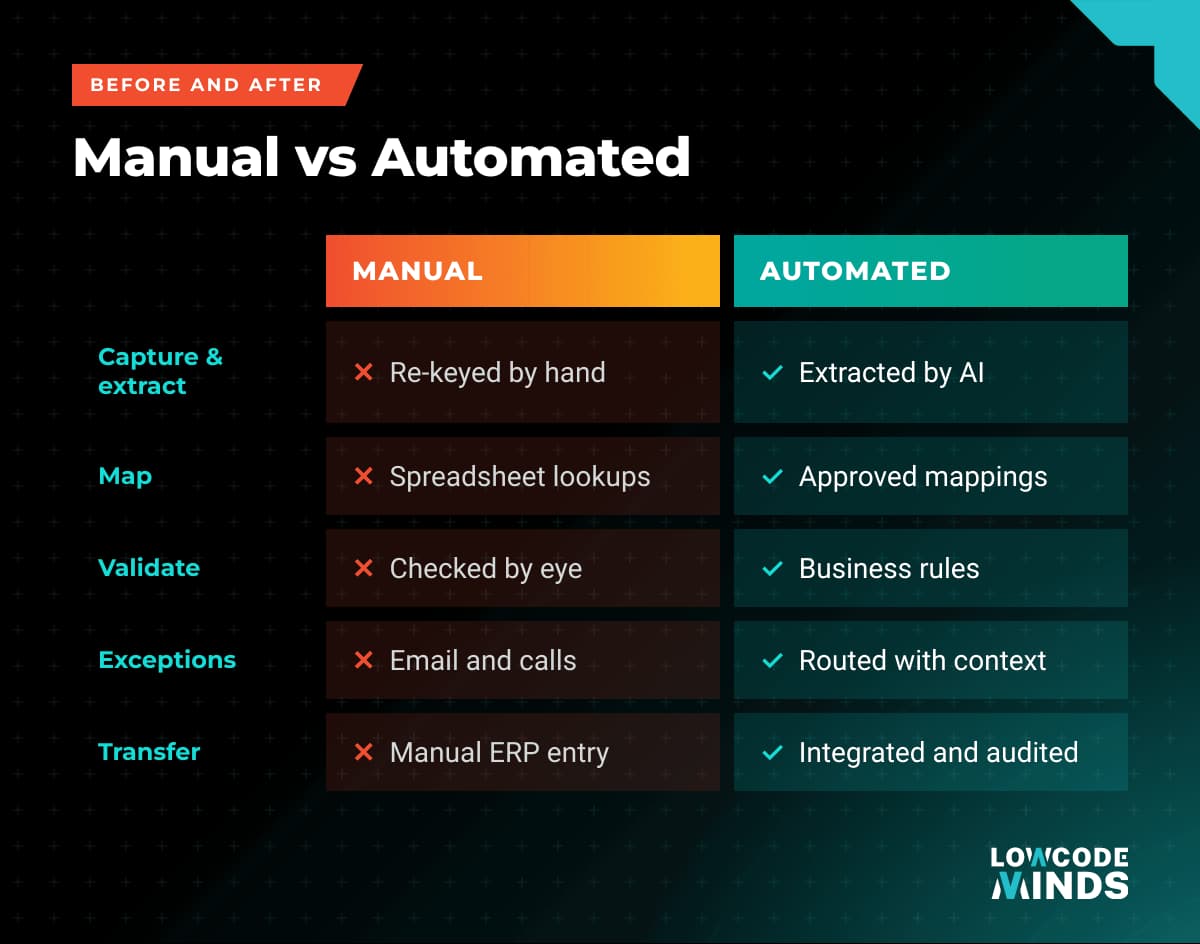
For document-intensive processes, this involves five key steps.
1. Capture and extract information from incoming documents
Documents received through emails, customer portals, supplier portals and shared repositories can be captured automatically.
AI-powered document processing can identify document types and extract relevant information from PDFs, spreadsheets, scanned documents and other formats.
Modern AI capabilities can accommodate a wider variety of layouts than approaches that rely exclusively on predefined templates, reducing the need to configure every new supplier or customer format individually.
2. Map extracted information to enterprise master data
The extracted information is mapped against the organization's existing data model and master data, including product codes, customer and supplier identifiers, color references, size specifications, units of measurement and payment terms.
When a buyer uses "NVY" in a purchase order, for instance, the system can check existing customer-specific mappings and the manufacturer's color master to identify the appropriate internal code.
Where multiple possible matches exist, AI can recommend suitable options for review.
3. Validate information against business rules
Before information is transferred into the ERP, it must satisfy the organization's operational and commercial requirements.
Business rules can automatically validate quantities, prices, tax calculations, mandatory fields, payment terms and other transaction-specific conditions.
Not every activity requires AI. Converting dozens into pieces or checking whether invoice line totals match the invoice amount can be handled through conventional automation.
AI is particularly useful where information needs to be interpreted, such as understanding a customer's free-text delivery instructions or identifying a likely match for an unfamiliar product description.
4. Route exceptions to the appropriate business users
An unfamiliar product code, a discrepancy in pricing or an ambiguous delivery instruction may require a business decision.
Confidence thresholds can help determine which extracted values or proposed mappings require additional review. Transactions that fall below established thresholds can be routed automatically to the appropriate employee. Sensitive or high-value transactions may require mandatory review regardless of the system's confidence.
Through enterprise process orchestration, employees receive the original document, relevant master data, suggested matches and supporting context needed to resolve the exception.
A merchandiser can resolve an ambiguous color reference, while a finance professional can investigate a mismatch between an invoice and a purchase order.
Approved corrections can be retained as governed, partner-specific mappings and revalidated when master data or business rules change. This reduces the need for employees to repeatedly resolve the same issues.
5. Transfer validated information into existing enterprise systems
Once the information has been extracted, mapped, validated and approved where required, it can be transferred into the ERP or other relevant business applications through supported integration interfaces.
An audit trail can record the source document, extracted information, validation results, exceptions, approvals and final transaction.
This enables organizations to move toward straight-through processing for routine documents while retaining appropriate controls over exceptions and higher-risk transactions.
Enterprise Use Cases for AI-Powered Document Processing
The need to interpret information from external business documents and translate it into internal systems exists across multiple industries and functions.
Manufacturing and merchandising: Customer purchase orders, product specifications and order amendments can be processed by mapping customer-specific product codes, colors, sizes, quantities and delivery requirements to internal systems.
Accounts payable: Supplier invoice processing can be automated by extracting invoice information, validating supplier details, matching invoices against purchase orders and identifying discrepancies before posting transactions.
Accounts receivable: Customer remittance advice can be interpreted and matched against outstanding invoices, reducing manual effort in payment allocation and reconciliation.
In one engagement with a leading U.S. print and mail enterprise, AI-powered billing automation and contract reconciliation helped achieve 99% invoice accuracy and an 80% reduction in manual workload.
Procurement: Supplier quotations, order confirmations and product catalogs can be processed to compare commercial terms and validate information against internal purchasing requirements.
Sales operations: Customer purchase orders received in different formats can be interpreted and converted into validated sales orders within existing ERP systems.
Logistics and distribution: Packing lists, delivery notes and shipment documents can be processed to reconcile SKU references, quantities and shipment information across business applications.
In each of these use cases, the value extends beyond reducing data entry. Automating the interpretation and validation of business information allows employees to spend more time on commercial decisions, customer relationships and genuine exceptions.
Can Enterprises Automate Document Processing Without Replacing Their ERP?
Yes. In many cases, enterprises can automate document processing by introducing an AI-enabled automation and orchestration layer around their existing ERP systems.
The ERP continues to serve as the system of record for business transactions and master data. The automation layer handles document classification, data extraction, intelligent mapping, validation and exception management before transferring approved information through supported integration interfaces.
Electronic Data Interchange (EDI) and API-based integrations already address this requirement for many trading partners. However, not every supplier or customer has the technology, transaction volumes or resources to support structured data exchange. Many continue to send purchase orders, invoices and other documents through emails, PDFs and spreadsheets.
AI-powered document processing complements existing EDI and API integrations by addressing these remaining document-intensive transactions.
For CIOs and CTOs, this provides an opportunity to improve operational efficiency without undertaking a large-scale ERP replacement program. Organizations can introduce automation incrementally, starting with high-volume document types and extending it across additional business functions.
The effectiveness of this approach depends on the quality of existing master data, available integration interfaces and the organization's business rules.
How Much Manual Effort Can Document Processing Automation Reduce?
The potential return on investment depends on document volumes, processing complexity, existing automation capabilities and the amount of manual intervention required.
Consider an organization processing 10,000 documents every month, with employees spending an average of five minutes interpreting, validating and entering information from each document.
That amounts to approximately 833 hours of manual effort every month.
If automation reduces this effort by 60%, the organization could release approximately 500 employee hours every month, or 6,000 hours annually. Based on a 160-hour working month, this is equivalent to the monthly capacity of just over three full-time employees.
This is an illustrative calculation rather than a guaranteed automation outcome or a reduction in headcount. The capacity released could help organizations manage growing transaction volumes, reduce processing backlogs and redirect employees toward higher-value activities.
The benefits also extend beyond time savings. Incorrect purchase order information can disrupt production, incorrect invoice entries can result in payment discrepancies, and incorrect shipment details can affect inventory accuracy and customer commitments.
When evaluating document processing automation, organizations should measure:
- Straight-through processing rate
- Manual processing time per document
- Exception and correction rates
- Accuracy of information transferred into enterprise systems
- Time from document receipt to transaction creation
- Downstream errors and rework
Measuring these outcomes together helps organizations determine whether automation is delivering meaningful operational improvements without compromising accuracy or business controls.
Where Should Organizations Start with Document Processing Automation?
A practical starting point is to identify a document-intensive business process where transaction volumes are high, manual effort is significant and processing errors have measurable consequences.
This could be customer purchase order processing in manufacturing, supplier invoice processing in finance or sales order entry in distribution.
Before selecting an AI solution, business and IT leaders should establish answers to five questions:
- How many documents does the organization process each month?
- How much employee time is spent interpreting, validating and entering information?
- Which activities require business knowledge rather than simple data entry?
- What are the most common exceptions, errors and sources of rework?
- Is the required master data available, accurate and accessible?
These answers help determine whether the immediate priority is improving master data, introducing AI-powered document interpretation or connecting fragmented business processes through orchestration and integration.
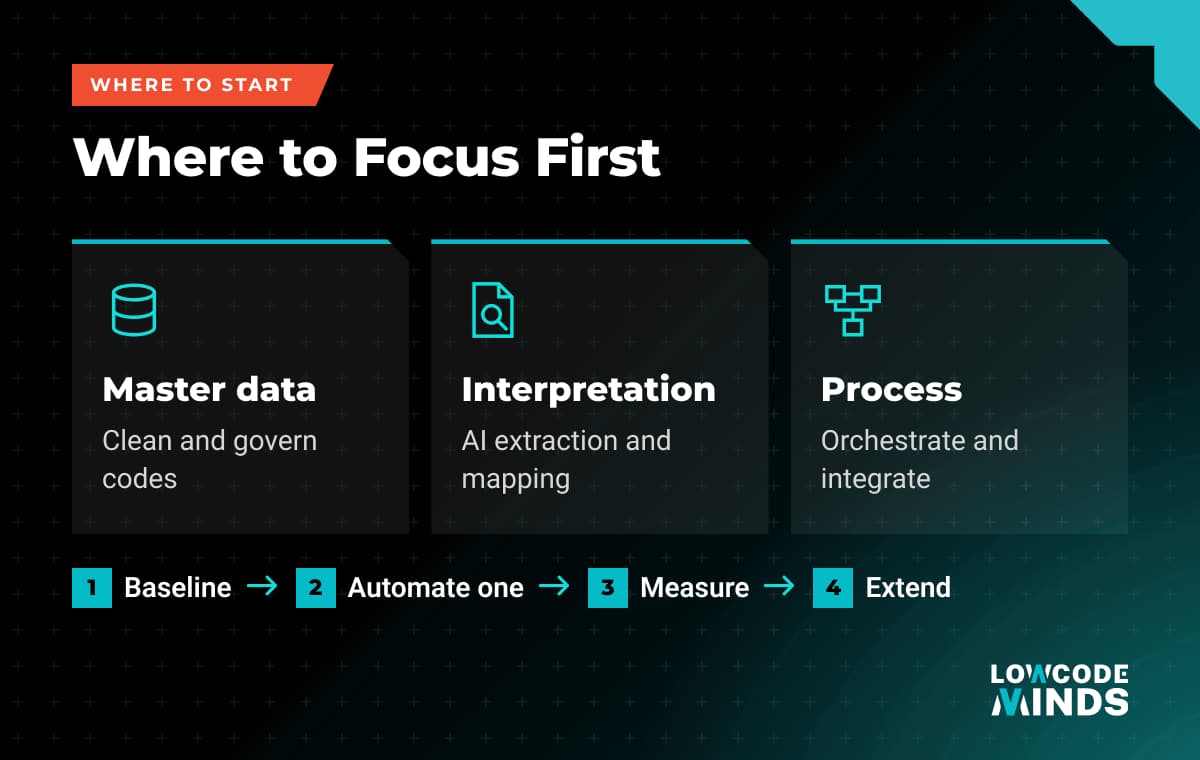
Organizations can then establish a performance baseline, automate a selected document type and measure the results before extending the approach across additional suppliers, customers and business functions.
How LOWCODEMINDS Helps Enterprises Automate Document Processing
LOWCODEMINDS helps enterprises automate document-intensive business processes by combining Intelligent Document Processing, Knowledge Work Automation, AI-led enterprise process orchestration and integration with existing business systems.
In an engagement with a global apparel manufacturer, LOWCODEMINDS helped address the complexity of processing buyer-specific requirement files and standardizing information for downstream business processes. The work also involved automating sales order and procurement workflows, helping connect information received from buyers with the operational processes that depend on it.
This experience reflects a common challenge across manufacturing, finance and other document-intensive operations. Extracting information is only one part of the requirement. The greater opportunity lies in making that information usable across business systems and processes.
Our approach begins with understanding how documents are currently processed, where employees spend their time, what business knowledge they apply and how information moves between applications.
Based on this assessment, we help organizations identify and automate activities that can deliver measurable improvements in processing time, data accuracy and employee productivity while maintaining appropriate governance and human oversight.
Looking to reduce manual document processing and ERP data entry?
Speak with our experts to identify automation opportunities within your existing processes, assess the potential operational benefits and explore how AI can work with your current enterprise systems.
Request a Document Processing Automation Assessment or write to us at [email protected] to discuss your business requirements.
AI-powered document processing automation uses artificial intelligence to classify documents, extract information, interpret unstructured content and map data to business-specific fields. Combined with business rules, workflow automation and system integration, it can automate activities from document receipt through to validated transaction creation.
OCR converts text from scanned documents and images into machine-readable information. AI-powered document processing can additionally interpret document structures, identify relevant information and propose business-specific data mappings. Business rules and human review help validate the information before it is used in enterprise systems.
AI can interpret variations in document layouts, field names and terminology. Extracted information is mapped against enterprise master data and approved partner-specific mappings. Uncertain matches or business exceptions can be routed to employees for review, reducing the need to manually configure every document format.
Yes. AI-powered document processing and workflow automation can be integrated with existing ERP systems through supported interfaces. The automation layer handles extraction, data mapping, validation and exception management, while the ERP remains the system of record for business transactions.
Enterprises can maintain accuracy by combining governed master data, deterministic business rules, confidence thresholds, risk-based human review and audit trails. Monitoring correction rates, exception rates and downstream errors helps organizations improve the reliability of automated document processing over time.
Enterprises should evaluate where document data is processed and stored, how AI models use that information, and whether the deployment meets their security and regulatory requirements. Appropriate controls may include private AI deployments, encryption, role-based access, data retention policies, audit trails and contractual restrictions on the use of enterprise data for model training.
About the Author

Hirushiharan Thevendran
Hirushiharan Thevendran is a Senior Software Engineer specializing in AI-driven automation, with around five years of experience designing and developing enterprise applications. His expertise spans workflow automation and agentic AI, with a focus on solving complex business challenges.
A Claude Certified Architect, Hirushiharan focuses on building scalable applications and translating emerging AI technologies into practical solutions that improve business processes and operational efficiency.
LOWCODEMINDS is a global leader in AI-led enterprise process orchestration and Knowledge Work Automation, transforming fragmented workflows into orchestrated, AI-driven decision systems that help enterprises modernize and scale business operations. Recognized as a Top Player and Contender in the ISG Provider Lens® Intelligent Automation Services 2025 (U.S.) study, the company is at the forefront of next generation automation and enterprise transformation.
LOWCODEMINDS helps enterprises transform knowledge intensive and compliance heavy enterprise value chains through trusted, governed, and scalable AI automation that delivers measurable operational and financial outcomes. Powered by App Labs, its dedicated innovation division, the company has developed 7+ Enterprise Value Chain Frameworks, 20+ reusable Agentic AI Accelerators, and 18+ enterprise ready solutions across industries including BFSI, Legal, Manufacturing, Retail, CCM, and Telecommunications.

Headquarters:
8, The Green Ste B, Dover, DE 19901.
[email protected]
(276) 451-3607
2026
LOWCODEMINDS | Privacy Policy