Order Management Automation Across Enterprise Systems

How to Automate Order Management Across ERP, Inventory, Shipping, and Invoicing Systems
Most enterprises do not have an order management technology problem. They already have ERP platforms, inventory management systems, shipping applications, invoicing tools, and other enterprise software supporting different stages of the order lifecycle.
The problem often lies in what happens between those systems.
An order may originate in one application, inventory availability may need to be verified in another, shipping may be managed through a third platform, and invoicing may happen somewhere else entirely. When these systems are not connected through an end-to-end business process, employees become responsible for moving information and work from one system to another.
That is when spreadsheets become order trackers, emails and chat messages become workflow tools, employees repeatedly check different applications for status updates, and exceptions depend on someone noticing a problem and following up with the right team.
Order management automation addresses this problem by orchestrating the complete order-to-delivery process across existing enterprise systems. Instead of replacing ERP, inventory, shipping, or invoicing platforms, process orchestration creates a workflow layer that connects them, coordinates tasks and decisions, manages exceptions, and gives teams visibility into the entire order lifecycle.
Why Order Management Remains Manual Even When Enterprises Have ERP Systems
Enterprise systems are typically designed to perform specific functions extremely well. An ERP may maintain customer, vendor, financial, and transactional information. An inventory platform may track stock availability. A shipping application may generate labels and track shipments. An invoicing system may manage billing.
Each system can work effectively on its own while the overall order management process remains fragmented.
Consider what needs to happen after a customer order is received. The order must be validated, inventory needs to be confirmed, fulfilment decisions may need to be made, approvals or exceptions may need to be handled, shipping needs to be initiated, delivery status needs to be monitored, and invoicing needs to occur at the appropriate point.
If every transition requires an employee to check another application, update a spreadsheet, send an email, reconcile information, or manually initiate the next activity, the organization does not have a truly automated order management process. It has automated systems connected by manual work.
As order volumes increase, these manual handoffs become increasingly difficult to manage. Delays become harder to identify, different teams may work with different information, exceptions can remain unresolved for longer, and operations managers have limited visibility into where an order is actually stuck.
What Is Order Management Automation?
Order management automation is the use of workflows, integrations, business rules, and process orchestration to coordinate activities across the complete order lifecycle with minimal manual intervention.
Rather than automating only an individual task, such as creating a shipping label or generating an invoice, end-to-end order management automation coordinates the sequence of activities required to move an order from creation through fulfilment, shipment, delivery, and invoicing.
A typical automated order workflow could look like:
Order creation → Order validation → Inventory verification → Approval or exception handling → Shipment processing → Delivery tracking → Invoicing
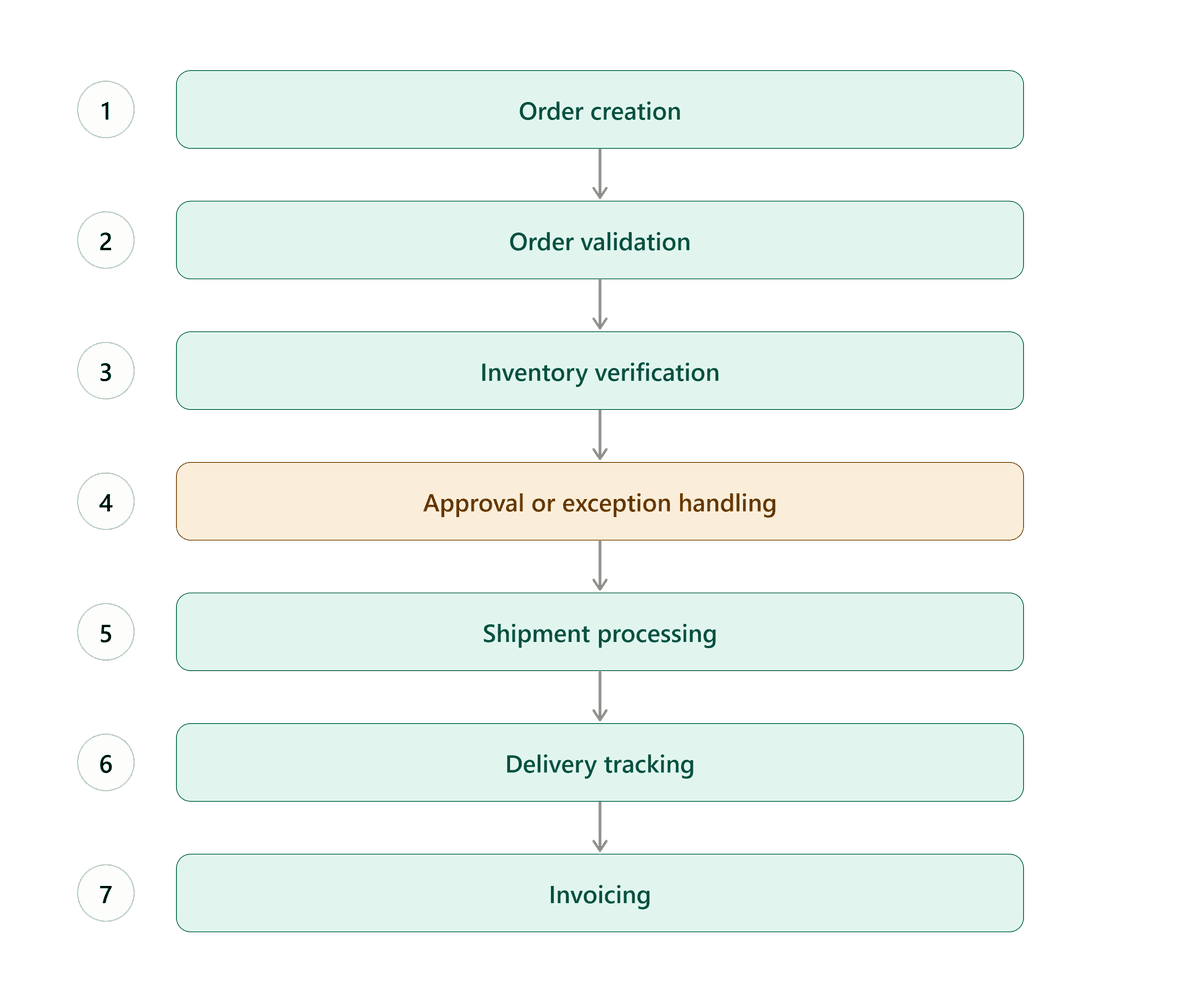
The individual activities may continue to happen within existing enterprise applications. The orchestration layer determines what should happen next, which system needs to be called, whether human intervention is required, and how exceptions should be handled.
This distinction between task automation and process orchestration becomes increasingly important as enterprise environments become more complex.
7 Signs Your Order Management Process Needs Better Orchestration
Organizations do not necessarily need to replace their existing systems to improve order management. In many cases, the first step is identifying whether the processes connecting those systems have become the bottleneck.
Common indicators include:
Teams maintain spreadsheets to track order status. Information may exist within enterprise systems, but employees still need a separate tracker to understand what is happening across the complete order lifecycle.
Employees repeatedly switch between applications. Operations teams spend significant time checking ERP, inventory, shipping, and invoicing systems simply to determine the status of an order.
Order fulfilment depends heavily on email and chat. Approvals, escalations, shipment issues, and exceptions are coordinated through informal communication rather than structured workflows.
Order, shipment, inventory, and invoice data require manual cross-checking. Employees become responsible for ensuring information across multiple applications remains consistent.
Exceptions are handled differently depending on who discovers them. There is no standardized workflow for assigning, escalating, resolving, and tracking order exceptions.
Managers cannot see where orders are getting delayed. Individual systems provide status information, but there is no centralized view of the end-to-end process.
- Increasing order volume creates disproportionately more operational work. Growth requires additional coordination because employees, rather than workflows, are connecting the systems.
When several of these conditions exist together, adding another isolated automation may provide limited improvement. The larger opportunity is often to orchestrate the process across the existing technology landscape.
Why Integrating Systems Is Not the Same as Orchestrating a Process
Integration and process orchestration solve related but different problems.
Integration allows systems to exchange data. For example, an ERP system may send order information to a shipping application, or an inventory platform may provide stock availability through an API.
But transferring data between two applications does not necessarily manage the business process surrounding that data.
What happens when inventory is unavailable?
Who needs to review an order when a business rule is triggered?
What happens if shipment creation fails?
When should an exception be escalated?
Should invoicing proceed if a particular fulfilment milestone has not been completed?
How does an operations manager know that an order has remained at the same stage for an unusually long period?
These are workflow and orchestration questions rather than purely integration questions.
Process orchestration provides the logic that coordinates systems, people, business rules, approvals, exceptions, and deadlines across the entire process. Integrations become components within that broader workflow rather than isolated connections between applications.
How Process Orchestration Connects ERP, Inventory, Shipping, and Invoicing
A process orchestration layer can sit across the existing enterprise technology landscape and coordinate the order lifecycle without requiring every underlying system to be replaced.
Order Creation and Validation
When an order enters the process, workflows can capture the required information, validate the data, and synchronize relevant details with the systems responsible for downstream processing.
Instead of relying on employees to determine what needs to happen next, business rules can automatically route the order based on factors such as order type, customer information, inventory status, or fulfilment requirements.
Inventory Verification
Inventory availability can be checked automatically through integrations with existing inventory or ERP systems.
If inventory is available, the workflow can continue immediately. If inventory is unavailable or another condition requires intervention, the process can create an exception and route it to the appropriate person or team.
This turns inventory verification from a manual status-checking activity into part of the automated order workflow.
Approval and Exception Management
Not every order can follow the straight-through path.
Some orders require approvals. Others encounter inventory shortages, incorrect information, shipment issues, or other exceptions.
Process orchestration allows these scenarios to be designed into the workflow. Tasks can be assigned automatically, escalation rules can be applied, deadlines can be monitored, and the resolution can remain connected to the original order rather than disappearing into an email or chat thread.
Shipment Processing and Delivery Tracking
Once fulfilment requirements have been completed, the workflow can initiate shipment-related activities through integrations with shipping platforms.
Shipment information and tracking status can then become part of the same end-to-end process view, giving operational teams visibility without requiring them to repeatedly visit another application.
Automated Invoicing
Invoicing can be triggered when predefined fulfilment milestones have been reached rather than relying on employees to manually initiate the next step.
Connecting invoicing directly to order and shipment workflows can also reduce the risk of delays caused by information not moving promptly between operational and finance teams.
Where Appian Fits Into Order Management Process Orchestration
Appian can serve as the process orchestration layer connecting enterprise systems, business rules, workflows, and users across an order management environment.
Rather than attempting to become the ERP, inventory management platform, or shipping system, Appian can coordinate the processes that span those applications.
For order management scenarios, this can include workflow orchestration across multiple platforms, automated task routing and approvals, centralized monitoring dashboards, real-time order status visibility, shipment tracking integration, exception management and escalation, and auditability across the process.
This approach allows enterprises to continue using systems that already perform important business functions while creating a unified process around them.
It also changes the employee experience. Instead of expecting operations teams to understand which application needs to be checked at each stage, the workflow can bring the relevant information, task, or exception to the appropriate user based on where the order is in the process.
What an Orchestrated Order-to-Delivery Workflow Looks Like
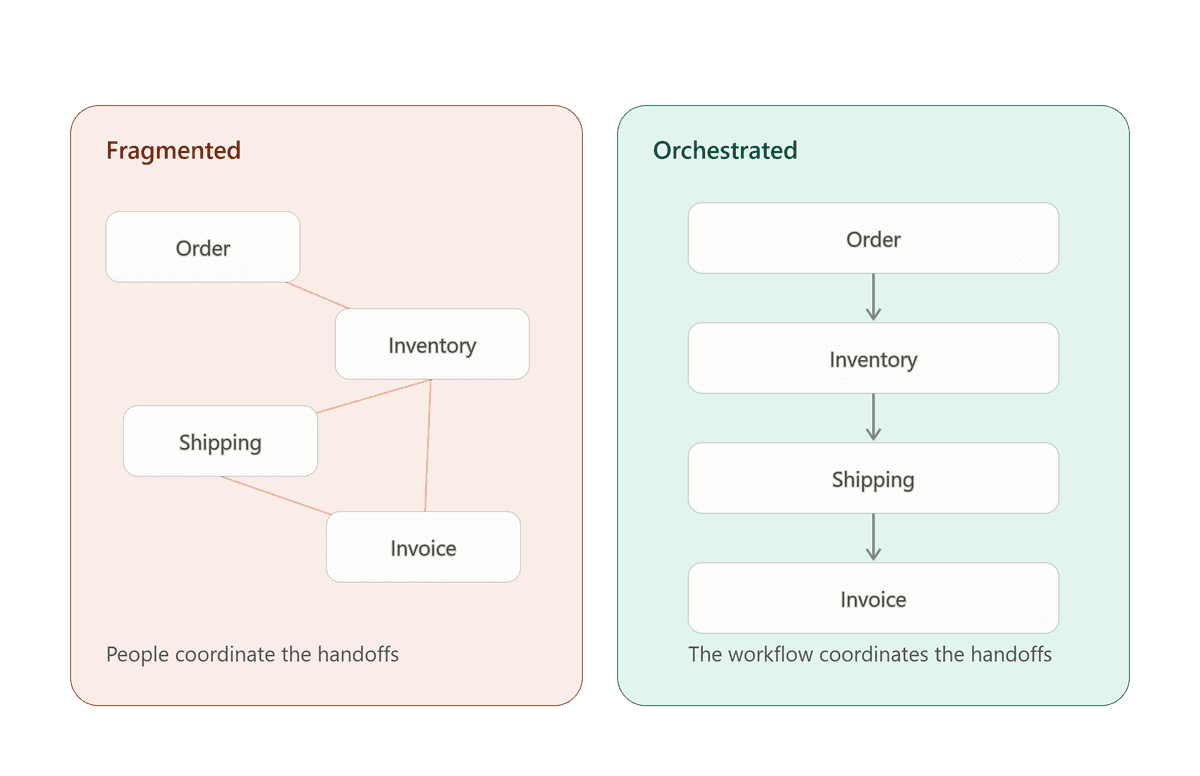
The biggest difference between fragmented order management and orchestrated order management is not necessarily the number of systems involved. It is who is responsible for coordinating them.
In a fragmented environment, people perform much of the coordination. Employees check systems, compare information, determine the next action, contact another team, update trackers, and follow up on exceptions.
In an orchestrated environment, the process performs much of that coordination.
The workflow knows that inventory verification must occur after order validation. It knows which conditions require approval. It knows when shipment processing can begin. It can recognize an exception and assign it to the appropriate team. It can monitor whether that exception has been resolved. And once the required fulfilment milestone is completed, it can initiate the next downstream activity.
Human involvement does not disappear. Instead, employees become involved where their judgment, approval, or intervention is actually required.
That is an important distinction for enterprises evaluating automation. The objective should not necessarily be to remove people from order management. It should be to remove the repetitive coordination work that prevents people from focusing on decisions and exceptions that genuinely require their attention.
Business Impact of End-to-End Order Management Automation
The value of process orchestration extends beyond reducing a few manual tasks.
When order workflows operate across disconnected systems, delays can accumulate at every handoff. An inventory check waits for someone to complete it. A shipment exception remains inside an email thread. An invoice waits because another team has not communicated that fulfilment is complete.
Connecting these activities through a structured workflow can help organizations improve processing speed by reducing waiting time between stages.
Centralized visibility can also make bottlenecks easier to identify. Rather than collecting updates from several systems and teams, operations managers can see where orders are in the process and which exceptions require attention.
Automated validation and system-driven handoffs can reduce errors created by repeatedly copying, updating, or reconciling information manually. Structured exception workflows can improve accountability because ownership, status, and escalation paths are clearly defined.
Most importantly, order volume can become less dependent on a corresponding increase in manual coordination. That creates a more scalable operating model as the business grows.
Do You Need to Replace Your ERP to Automate Order Management?
Not necessarily. If the underlying ERP, inventory, shipping, and financial systems continue to perform their core functions effectively, replacing them simply because the end-to-end process is fragmented can introduce significant cost, risk, and implementation complexity.
The better question is: Are the systems the problem, or is the process between the systems the problem?
If employees are spending their time moving information between applications, tracking status in spreadsheets, coordinating handoffs through email, and manually managing exceptions, the opportunity may be process orchestration rather than wholesale system replacement.
A workflow and orchestration layer can allow enterprises to modernize how work moves across existing systems while preserving technology investments that still provide value.
When Should Enterprises Consider Order Management Process Orchestration?
Process orchestration becomes particularly relevant when order fulfilment spans several enterprise applications and business teams.
It is worth evaluating when order volumes are growing but operations are struggling to scale, employees spend substantial time tracking and coordinating orders, fulfilment delays frequently occur between departments or systems, exceptions require significant manual intervention, or management lacks a reliable end-to-end view of order status.
Enterprises should also consider orchestration when replacing core ERP or supply chain platforms would be disproportionately expensive or disruptive compared with the actual problem they are trying to solve.
The goal is not to add another application simply because the architecture is complex. The goal is to create a process layer capable of coordinating the technology and people already involved in getting an order from creation to delivery.
Automate the Work Between Your Systems
ERP, inventory, shipping, and invoicing platforms may each automate important parts of order management. But customers experience the outcome of the entire process, not the performance of an individual system.
When employees still need spreadsheets, emails, manual status checks, and repeated follow-ups to keep orders moving, there is a gap between system automation and process automation.
Process orchestration closes that gap by connecting systems, workflows, business rules, exceptions, and people into a coordinated order-to-delivery process.
If your organization is looking to automate and orchestrate order management across ERP, inventory, shipping, and invoicing systems, or modernize another complex business process, LOWCODEMINDS can help. We help enterprises identify high-friction workflows, connect existing systems, and design end-to-end processes using Appian that reduce manual coordination and improve operational visibility and scalability. Reach out to us at [email protected] to discuss your process automation and orchestration needs.
Order management process automation uses workflows, integrations, business rules, and automation to coordinate activities such as order validation, inventory verification, approvals, shipment processing, delivery tracking, exception handling, and invoicing across the order lifecycle.
Yes. When existing systems continue to perform their core functions effectively, a process orchestration platform can connect ERP, inventory, shipping, and invoicing applications and automate the workflows between them without requiring a complete ERP replacement.
System integration primarily enables applications to exchange data. Process orchestration coordinates the broader business workflow, including system interactions, human tasks, business rules, approvals, exceptions, escalations, and process monitoring.
Appian can act as an orchestration layer across existing enterprise applications. It can coordinate workflows, integrate systems, automate task routing and approvals, manage exceptions, provide centralized process visibility, and maintain an auditable record of activities across the order lifecycle.
Organizations can automate or orchestrate order creation and validation, inventory verification, approval workflows, exception handling, shipment initiation, delivery tracking, invoicing triggers, notifications, escalations, and other activities that move an order from receipt through delivery.
Common signs include extensive spreadsheet tracking, frequent switching between applications, order coordination through email and chat, manual reconciliation of data across systems, slow exception resolution, limited end-to-end visibility, and increasing operational effort as order volumes grow.
No. Process orchestration becomes relevant whenever the complexity of coordinating work across multiple systems and teams creates operational friction. The business case depends more on process complexity, transaction volume, manual effort, and the cost of delays than on organization size alone.
About the Author

Thilak Das
Thilak Das is a Low-Code Architect specializing in Appian and Zoho, with over 9 years of experience designing and building enterprise solutions. His expertise spans process automation, low-code architecture, and digital transformation, with a focus on creating scalable solutions for complex business processes. He also shares practical insights on low-code development, architecture best practices, and emerging technology trends.
LOWCODEMINDS is a global leader in AI-led enterprise process orchestration and Knowledge Work Automation, transforming fragmented workflows into orchestrated, AI-driven decision systems that help enterprises modernize and scale business operations. Recognized as a Top Player and Contender in the ISG Provider Lens® Intelligent Automation Services 2025 (U.S.) study, the company is at the forefront of next generation automation and enterprise transformation.
LOWCODEMINDS helps enterprises transform knowledge intensive and compliance heavy enterprise value chains through trusted, governed, and scalable AI automation that delivers measurable operational and financial outcomes. Powered by App Labs, its dedicated innovation division, the company has developed 7+ Enterprise Value Chain Frameworks, 20+ reusable Agentic AI Accelerators, and 18+ enterprise ready solutions across industries including BFSI, Legal, Manufacturing, Retail, CCM, and Telecommunications.

Headquarters:
8, The Green Ste B, Dover, DE 19901.
[email protected]
(276) 451-3607
2026
LOWCODEMINDS | Privacy Policy